If you have joined a Discord server, you might have noticed that some servers have emojis and symbols in the text and voice channel names.
If you manage your own Discord it is very easy for you to add emojis or symbols yourself. Emojis can be added to category names, text channel names and voice channel names. Just follow the simple steps below.
Example of emojis in the channel names:
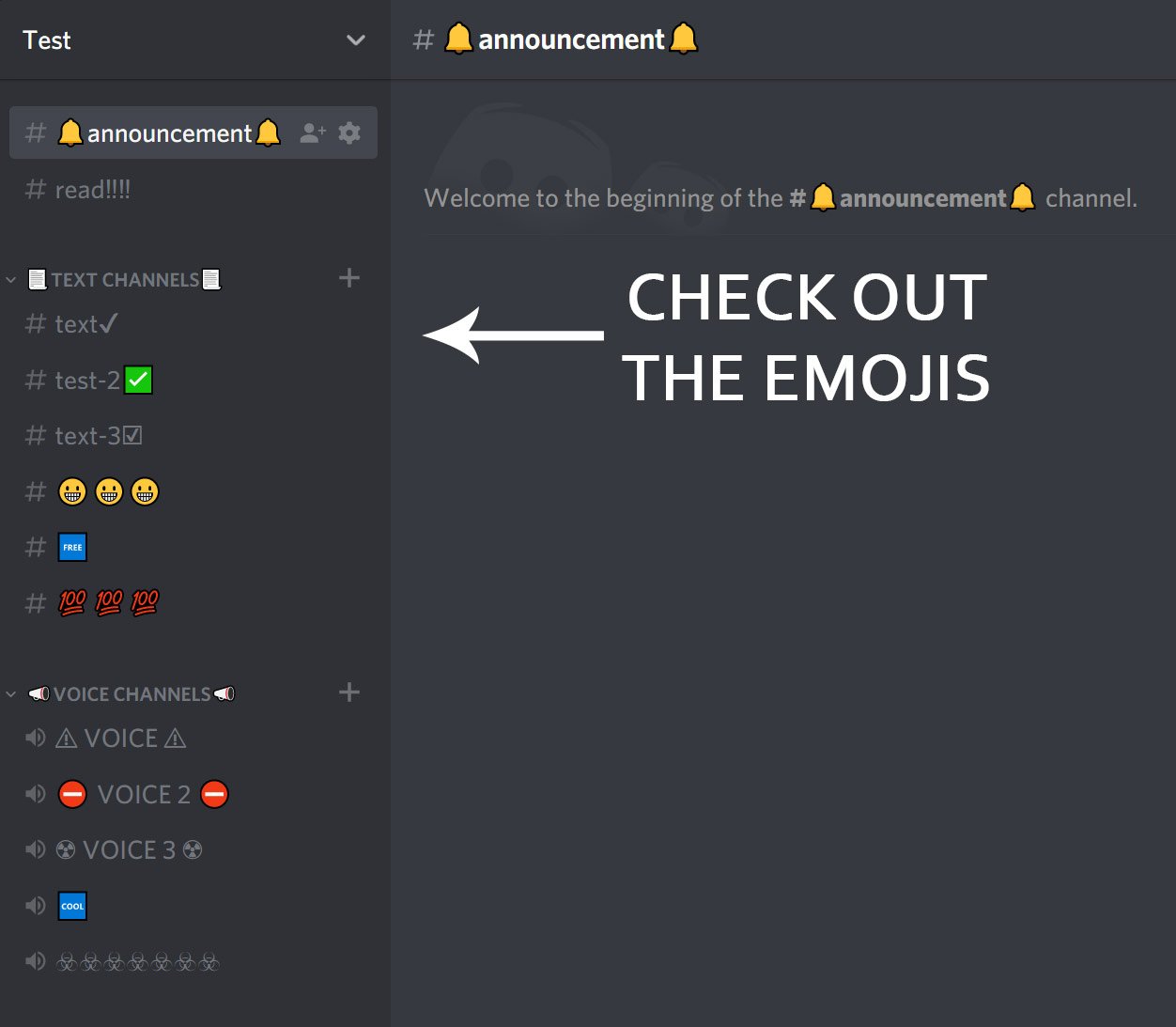
Almost any emoji that are available in the browser can also be added to the Discord channel name.
How To Add Emojis to Channel Name
- Find the emoji you want in the channel name. A full list of emojis is available here: Full Emoji List.
- Copy the emoji “Browser” column. You can copy it by selecting it with your mouse and then press “CTRL + C” on your keyboard.
- Go to your Discord server and right-click the text or voice channel where you want the emoji in the name, and then choose “Edit Channel” from the dropdown menu.
- Paste the emoji in the “Channel Name” field. You can paste it by pressing “CTRL + V” on your keyboard.
- Click “Save Changes” and you are done!
You can now be much more creative with your Discord server names.
Please note, that you can not use custom emojis in your channel names. Only emojis included in modern browsers. New emojis are added over time, and with time Discord will also add support for more of these emojis.
If you have any questions, please feel free to leave a comment.
You can also check out our Discord servers to see how it looks.




Thanks, just what I was looking for!
this didn’t work for me, all I see is :gem: .
any suggestions?
@ElitezViper02 There cant be server emojis in the name :/
There is a special way to do it, using codes and commands like the :gem: will not work.. I have a set of instructions and examples in my response to this question above..
I tried this and my sever show up as :gem:, is this just because it is my sever. If not then any other suggestions?
see my response above… Adding code and the : does not work in the description area. I have also added proof for another user to show that the way I do it does work. Perhaps it can help you.
when i put in the code from the list, it just shows up as the code text, not the emoji. am i missing a step?
see my text above, codes and stuff will not work in the description fields, you need to do it a certain way to get the emoji to appear in the description area. I also responded to someone else who doesn’t believe it works, so I provided proof, feel free to look at this so you will know how to do it.
Instead of trying to add the code text, or doing any of the :emoji: commands within the Channel Description Do this instead:
1 Go to the Full emoji list
2 Find the Emoji that you wish to use within your channel name description
3 Go over to the Emoji column and use your mouse to highlight the Emoji
4 Copy the Emoji to your clipboard
Here is an example: 😃
5 Go back to your discord server and the channel name Description
6 Use the paste command – you will see the emoji like the example, but not the code text or the emoji info within the : :.
Example:
Correct way – “😃 Welcome to my discord server”
Not:”U+1F603 Welcome to my discord server” or “:grinning_face: Welcome to my Discord server”
To answer AkaCrafter CZ’s statement “There cant be server emoijs in the name :/”
The answer is, yes you can, if you know the correct away to do it, as I have provided above 🙂
hope this helps 🙂
thanks dude
You are more than welcome Zangy 🙂
This is a real answer. Thank you.
you are more than welcome Azhem 🙂 There are a few who claim it doesn’t work… I even had to prove it. 🙁 Why would I make this stuff up, I ask myself.
It does answer how to use STANDARD globally known emoji’s. Pro settings did already make that pretty clear, ty prosettings. But the person you retaliated to, knew this information already and wanted to know how to do “CUSTOM HOME MADE NO GLOBAL STANDARD HIS “OWN” CREATION” in the channel names. If “BOTH” of you had read the initial post that states its not supported(ty prosettings), also, that he was asking a “specific” question, this wouldn’t seem like such a dumb and useless nonsensical argument.
No, this does NOT work for custom Discord server emoji’s.You can NOT select any of the emoji’s in the list to copy and paste.
If you know of some magical way, please provide the step-by-step instructions. What you have above does not work for the Discord server emoji list at all. Left-clicking on an emoji puts it in the chat input. Right-clicking on an emoji does nothing. It doesn’t allow you to select one to copy/paste.
Please prove me wrong. 🙂
https://uploads.disquscdn.com/images/5f3003e0958eb9dcdbe7350826c90f813b2822398f3b85930ecf5825d57fb510.jpg
I do not wish and I will not argue with you, and I also do not feel that it is necessary to prove anyone right or wrong, but if you insist then I have provided a screenshot. To the right of the photo it shows me obtaining a copy of the “party Popper” emoji. I highlighted the emoji (turned it blue), then I copied it to my clip board. Then if you look on the left you will see that I created a text channel name “Giveaway” (it will also work in the voice channel) and I have pasted that same emoji into the channel’s description, proving that what I have said is true and that, yes it DOES work.
The key here I believe is that the emoji needs to be a type of text for it to go into the description field, all I know is, codes and stuff will not work. I just know that the way I have been doing it WILL work, as my screenshot can clearly show you.
I don’t have too, because I know it works… I am doing it all the time the way I put out. Not all emoji will be compatible in the channel section where you will put the emoji, so you will have to keep trying… but I do know for a fact that this way works, because I have repeatedly done it over and over. I’m not going to argue with you, you will either believe or you will not believe… I don’t have time to argue this with anyone. But if you insist that I provide Proof, check out the following link:
https://cdn.discordapp.com/attachments/600915377815552030/662217550159020033/step_1.jpg
https://uploads.disquscdn.com/images/f16aa2e0e9d26abc7e4a0eaa600270f3ad6fb5a51c039fce8ba2e87928e51ffe.png
I know that the way I do it works, because I have been doing it for the entire year of 2019. I do not wish to argue with anyone, and I sure do not wish to prove a person right or wrong, because all I care about is the truth. I do not have any reason to make this stuff up, so I want to show stuff from my own Discord Server and show that what I have said above, does work. Perhaps it just needs to be done a certain way, or that it isn’t being done correctly, I don’t know. Perhaps this example will help… and I was asked to prove it. I have thought that perhaps I am saving the emoji as a text instead of a code, etc. I don’t know.. I just know it works.
We thought that our guide was understandable, but thank you for clarifying to others
Hello,
Do you know why some emoji not colored, like for example the 🕹 (:joystick:) or the ⚔ (:crossed_swords:) ?
Thx for your guide.
cant use the irish flag 🙁